Health Checks
The page does not refresh on its own: every value is read when the page opens, or when you click Refresh, at the top right.
Overview
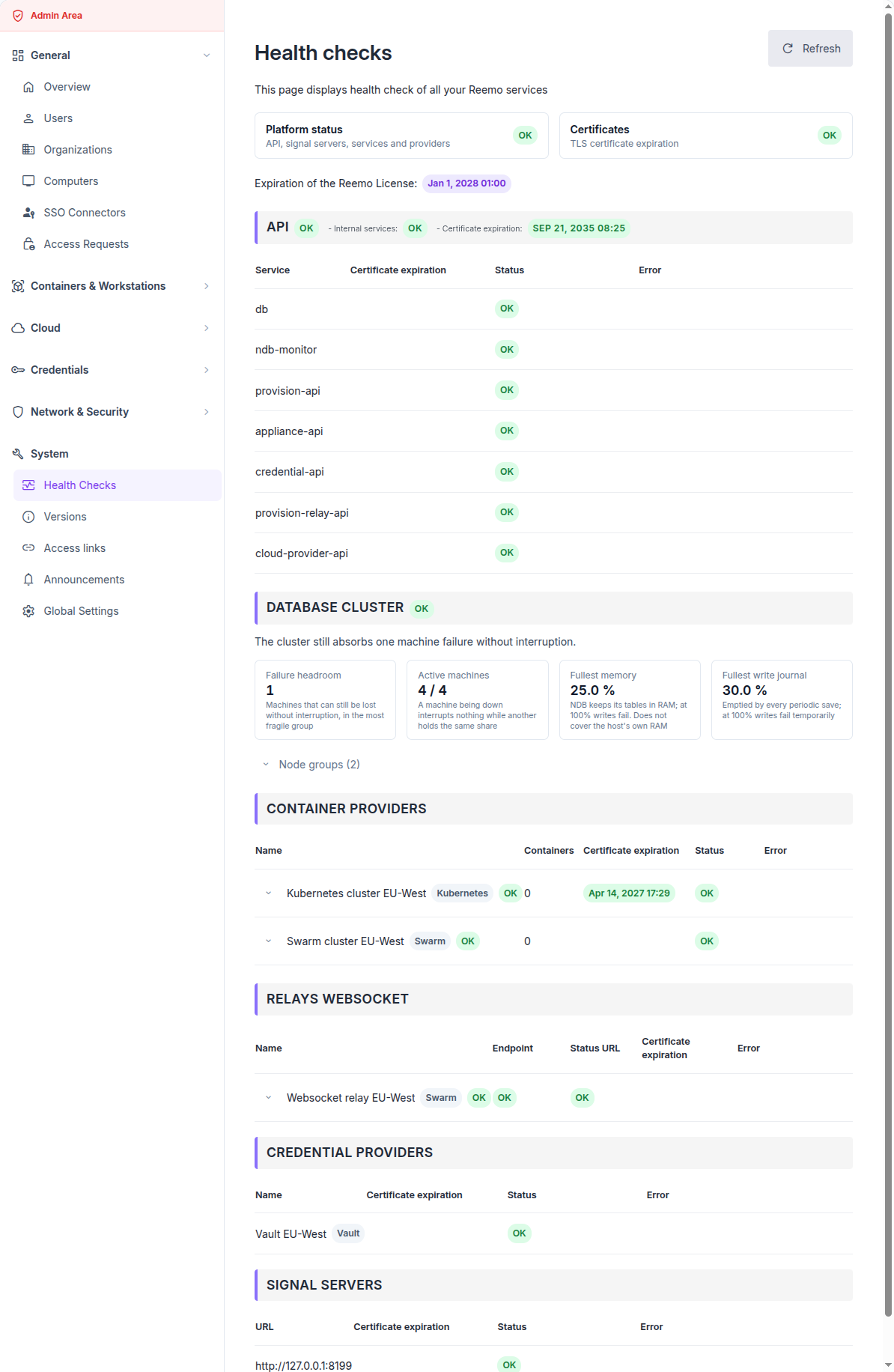
The Health Checks page on an operational platform
The page is organised as follows:
Two tiles summarise the platform and the TLS certificates it uses.
One section per family of services lists each entry with its status and, on failure, its error.
A Node details button opens, for a container provider or a websocket relay, the state of each node of the cluster.
Platform status and certificates
Hover a tile to list what brought it out of the OK state.
Platform status covers the API, the signal servers, the internal services and the providers:
ERROR: the API does not answer, or one of its internal services is down, or every signal server is down.
WARNING: some signal servers are down, or at least one provider is in error, or the database cluster is degraded while still serving.
OK: none of the above.
Certificates covers every TLS certificate the page knows about, against two thresholds set on the instance:
ERROR: a certificate could not be read, or expires within the error threshold.
WARNING: a certificate expires within the warning threshold.
OK: every certificate is readable and outside both thresholds.
Note
A cluster with nodes in error does not turn the Platform status tile: as long as the cluster answers through its entry point, the service stays available. Only the node diagnostic reports it.
Detailed sections
APIs
This section groups the internal services Reemo needs to operate. Its heading shows three pieces of information: the status of the API, the status of the Internal services, and the expiration of the API certificate.
The status of the API alone turns to error when the database is unreachable. The other services in the table feed the Internal services status:
db: the database,
provision-api: container provisioning,
provision-relay-api: websocket relay provisioning,
credential-api: credential providers,
cloud-provider-api: Cloud Provider integrations,
appliance-api: appliances registered on the instance,
record-api: session recording, on an instance where it is enabled.
Note
record-api also watches the storage of the recordings. At the warning threshold, the service turns to Warning. At the critical threshold, or when the recordings volume is missing, not writable or unresponsive, it turns to Error and the Internal services status turns to error. In both cases, the Error column gives the usage and the threshold reached. Both thresholds are also raised as alerts, see the Alerting Event Catalog.
Database cluster
This section appears on an instance whose database runs on a MySQL NDB Cluster, and whose supervision service is enabled. It shows how much failure the cluster can still absorb.
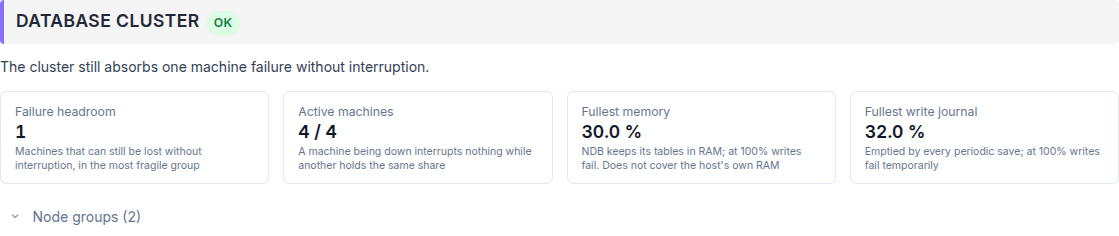
A healthy database cluster
Failure headroom: the number of machines that can still be lost without interrupting the service, counted in the most fragile group.
Active machines: live data machines out of the total.
Fullest memory: NDB keeps its tables in RAM; at 100 % writes fail.
Fullest write journal: emptied by every periodic save; at 100 % writes fail temporarily.
A sentence above the tiles summarises the situation. Below it, each reason names one fault, with its technical detail in grey. Node groups lists each group, the machines it holds and the number of copies still live.
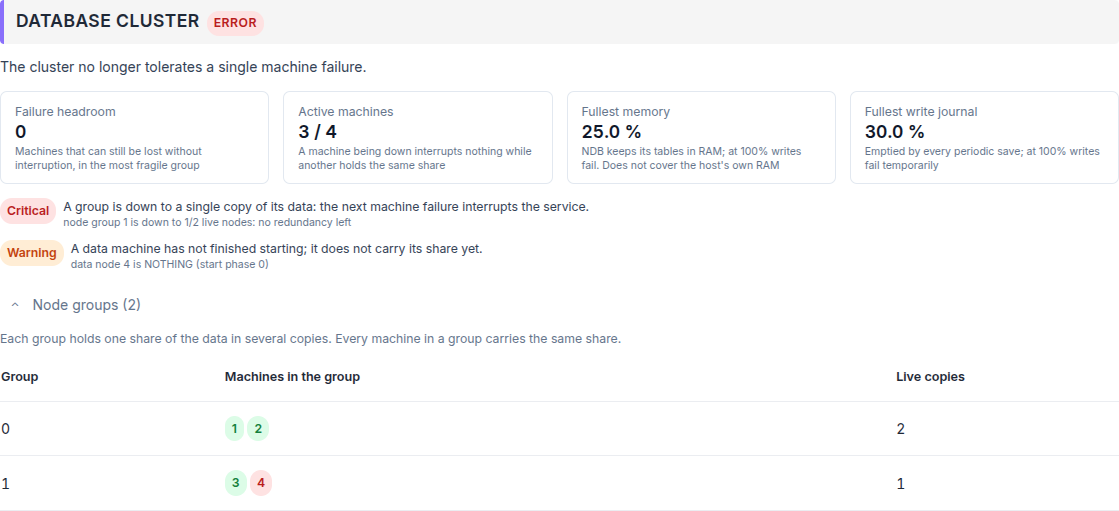
A cluster that no longer tolerates a single machine failure
Note
A degraded cluster still serves: the service stays OK in the table above. The nuance appears in this section’s badge and in the Platform status tile, which reads WARNING.
Expand Data machines to spot the machine that is filling up or not starting. The table has one row per data machine.
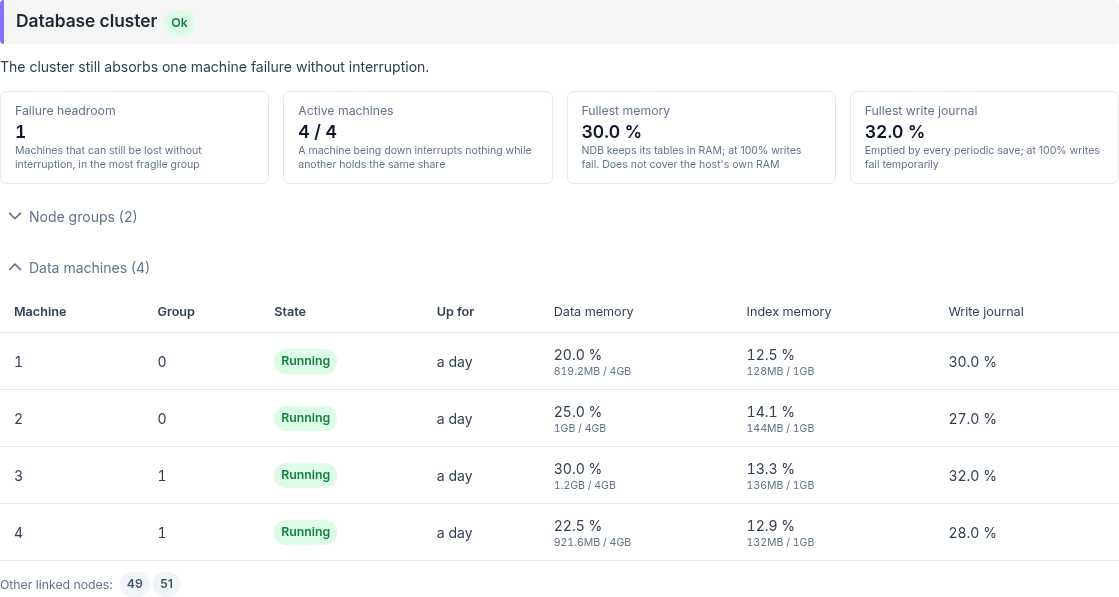
The data machines in detail
Machine: the node number of the machine in the cluster
Group: the node group of the machine, n/a when it has none yet
State: Running, Starting with the current phase, Stopping or Stopped
Up for: the time since the machine last started, n/a while it is not running
Data memory: the share in use, then the space used out of the space configured
Index memory: the same measure for the index pool, n/a when that pool is not configured
Write journal: the fullest part of the machine’s write journal
The Fullest memory and Fullest write journal tiles show the highest value of this table.
Other linked nodes, under the table, lists by node number the SQL servers, management servers and tools linked to the data machines.
When the node numbers of the expected SQL servers are declared in the NDB supervision service, an SQL server linked to no data machine adds the reason An expected SQL server is linked to no data machine and turns the section badge to Warning. For example, with SQL server 51 declared, stopping that server raises this reason, along with one A link between two machines is down reason for each data machine it was linked to, and 51 drops out of Other linked nodes.
Container Providers
This section lists the container clusters configured on the instance, one row per cluster. Each row carries the provider name and its type, the number of containers it runs, the expiration of its certificate, its status and its error.
Relays websocket
This section lists the websocket relays, one row per relay. Endpoint and Status URL are probed separately: a relay answers on its cluster endpoint to be managed, and on its status URL to be reached by a client.
Credential Providers
This section lists the credential providers configured on the instance, with the status returned by each vault.
Signal servers
Signal servers establish the WebRTC connections between users and resources. Each row shows the server URL, the expiration of its certificate and its status.
Node details
A container provider and a websocket relay each stand in front of a cluster of several machines. The status columns of their tables report the cluster as a whole, through its entry point: a cluster that has lost a node therefore keeps answering and keeps reading OK.
The badge beside the name reports the cluster node by node. The arrow before it opens the detail.
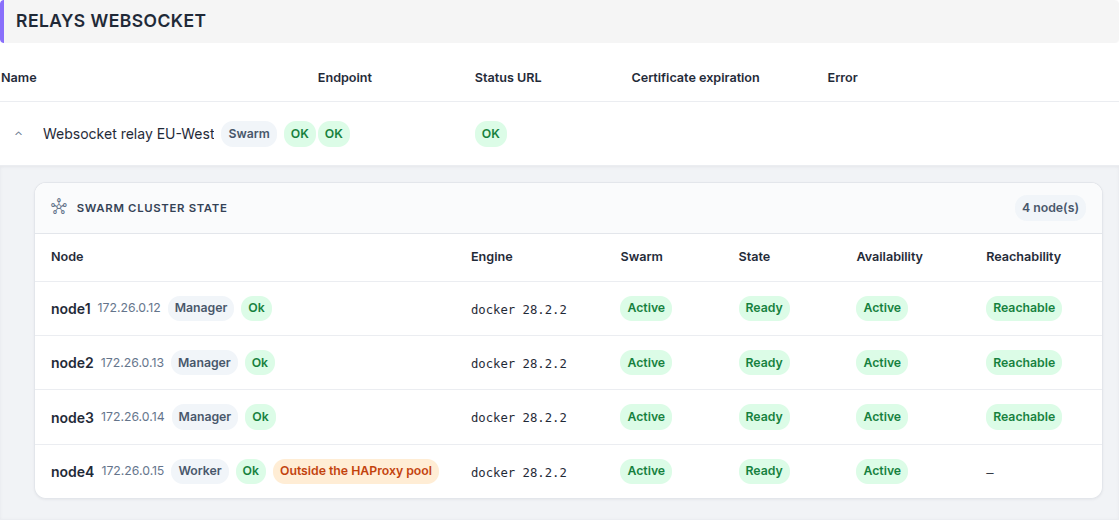
A relay whose four nodes are all operational
On the screenshot below, Endpoint and Status URL are both OK, because HAProxy keeps routing to the surviving nodes. The badge reads ERROR because one node stopped answering.
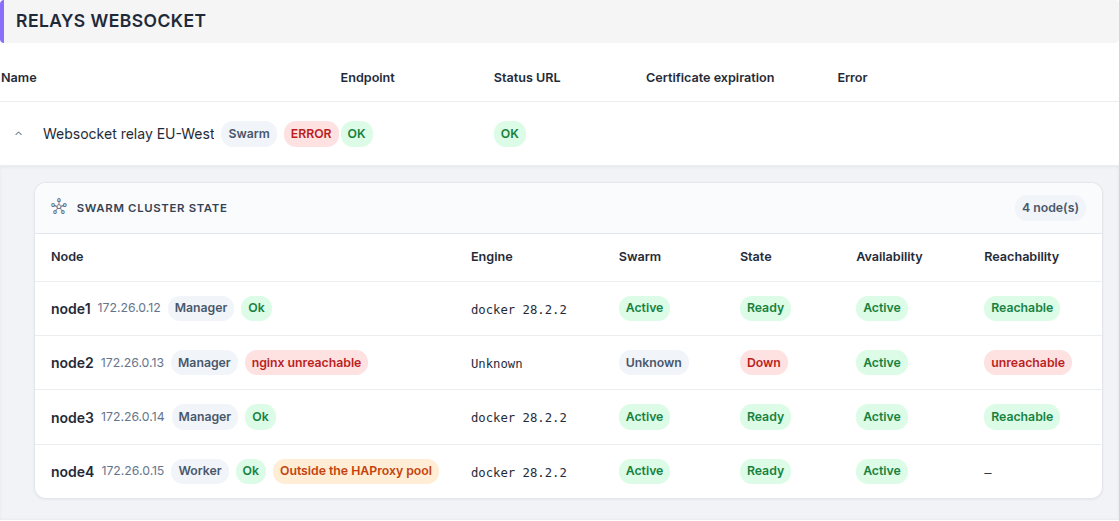
One node down behind a relay that still answers
The badge takes four values:
OK: every node is in the state its role requires.
WARNING: a fault without loss of service, on a node no traffic is expected of.
ERROR: at least one node that should be serving traffic is not.
not available: the diagnostic could not be run, for instance while an appliance is offline.
See also
Node Diagnostics — every node state, the aggregation rules, and how to read the HAProxy statistics.
Operation
Refresh the page with the Refresh button, at the top right.
When a service fails, the Error column gives the reason. Hover it to read the full text and copy it.
Consult this page regularly: it reports a certificate close to expiration, a service that stopped, or a cluster that lost its redundancy.