Container Placement Constraints
Placement constraints let you control precisely which nodes of your cluster your containers will run on. This system works together with labels attached to the nodes of your Container Provider (see Node Labels and Placement Constraints).
How It Works
Placement is calculated by comparing the constraints defined on your profile with the labels present on your nodes. A constraint is made up of three elements:
Key: the identifier of the criterion you want to target (e.g.
location,gpu,env).Operator: the comparison rule. Two operators are available: Equal (the node’s label must exactly match the value) and Not Equal (the node’s label must differ from the value).
Value: the characteristic expected on the node (e.g.
paris,nvidia,prod).
Practical Example
Suppose you have two geographically distant nodes and want to force the containers of a profile to deploy only on the node located in Brest.
Step 1: Add labels to your nodes
From verified_user Admin Area > Container Providers, edit the labels of each node (see Labels):
Paris node:
location=parisBrest node:
location=brest
Step 2: Create the constraint on the profile
In your container profile’s configuration, under Constraints, add the following rule (see Container Profiles for the full profile creation procedure):
Key:
locationOperator:
EqualValue:
brest
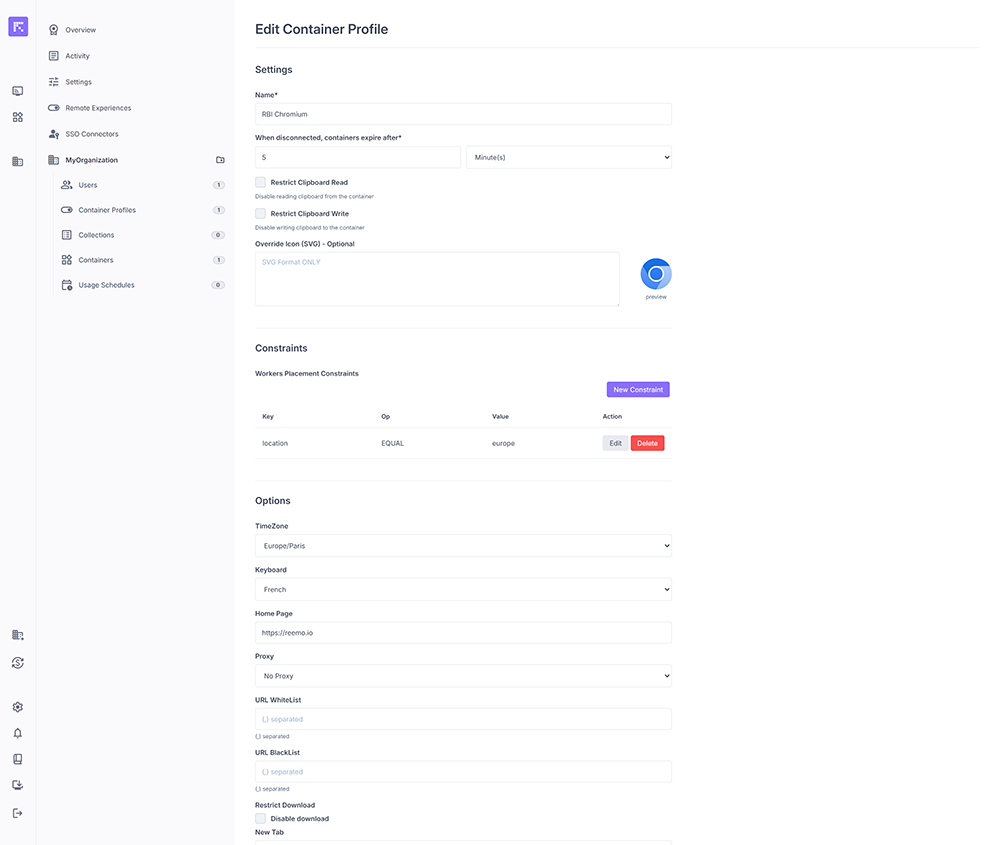
The constraint appears as a Key / Operator / Value table on the profile (here with the example location equal to europe ).
Result: on launch, the system will automatically deploy all containers from this profile on the node carrying the location=brest label, excluding the other nodes of the cluster.