Security Logs
The Security Logs tab displays the history of actions related to the viewed resource.
General View
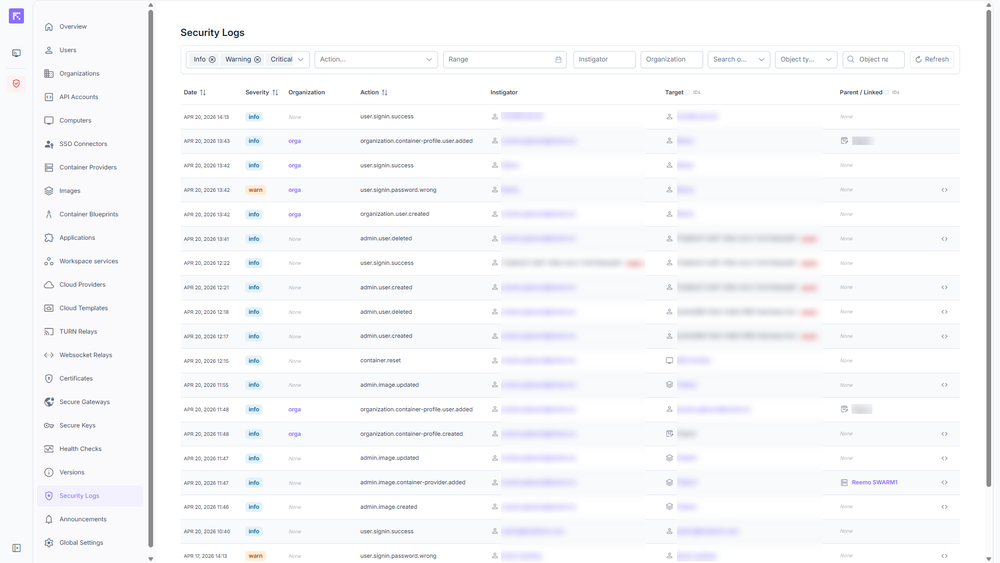
Security logs from the instance console
Access Levels
Access to Security Logs adapts to the context and management level.
Instance: Displays all logs for the entire instance.
Organization: Displays only the logs related to the viewed organization.
Group: Displays logs for resources managed by this group. (Note: events for a resource that is merely a member of the group without being managed by it, will not be displayed).
Resource Views
When accessed from a profile, the tab automatically filters events related to that specific object:
Computers, Workspace services, and Container profiles: Displays events where the resource is the Target or Parent/Linked object.
Users: Functions the same way, but includes an additional toggle to switch between actions received (Target) and actions performed by the user (Instigator).

Toggle between Target and Instigator views
Search Filters
The top bar allows you to filter events:
Severity: Info, Warning, Critical.
Action: Hierarchical dropdown menu to filter the type of operation. Expand the tree to target a specific action (e.g., Organization > Container Profile > User > Created).
Range: Calendar selection.
Target / Instigator: Name of the action trigger.
Organization: Name of the related organization.
Search on target: Search scope (Target only, Parent/Linked only, Target & Parent/Linked).
Object Type: Announcement, API Account, Application, Certificate, Cloud Provider.
Object Name: Name of the targeted resource.
Refresh: Updates the event list.
Metadata
In the results list, an icon (<>) located on the right side of certain rows displays additional details in JSON format. This metadata provides precise tracking of the action (e.g., showing the old and new names when an object is modified).
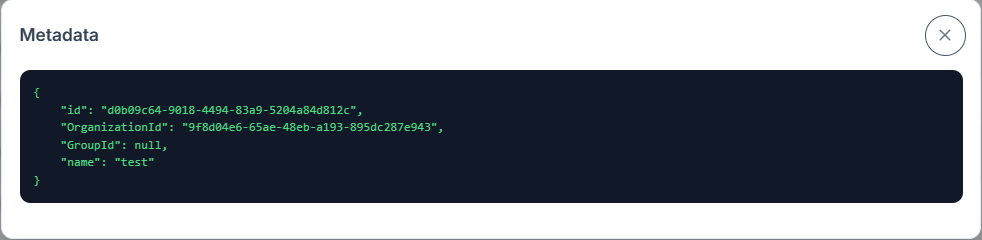
Metadata details in JSON format